
Sunday, September 7, 2014

BIG DATA 101

Big Data is one of the 4 technologies (Mobile, Cloud, Social and Big Data) that make up 3rd Platform.

Big Data is defined as any data that cannot be handled using traditional IT methods
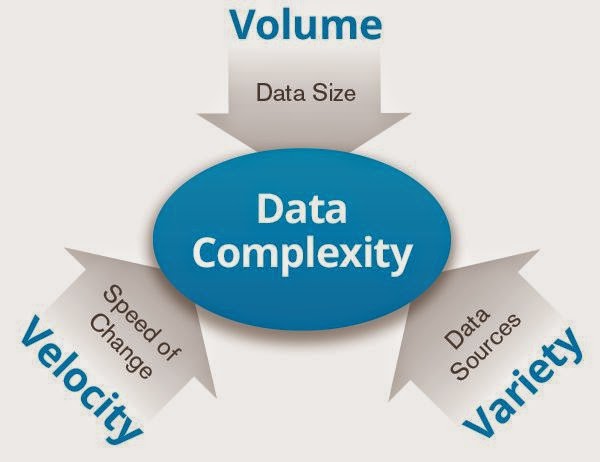

Big Data Challenges


Calling it BIG data makes people only think that it's about the VOLUME of data but Big Data encompasses fast velocity data as well as varied types of data.



3 Vs


Volume

Velocity

Variety 


Volume:

Data, free to create, NOT to store. IT has been storing digital data for 50+ years. As the cost of data storage devices decrease, the trend toward retaining low value data has been on the rise. After all there is value in ALL data if you just find a way to extract it. While it's hard to store 100 million pennies, if you find a way to cash them in... it's still 1 million bucks. The trick is finding a low cost method to store, manage and extract value from the data.
Hard drive capacities have increased making it easier to store large amounts of data on fewer drives. The cost however is not simply the device to store the data on but from managing the data. Large volumes of low value data require you need to leverage technologies like...

Data Compression


Compression - a method of storing the same amount of information in less space. Not all data is compressible. Media files like pictures and video are already compressed and cannot be stored in a smaller size. Encrypted data is not compressible.
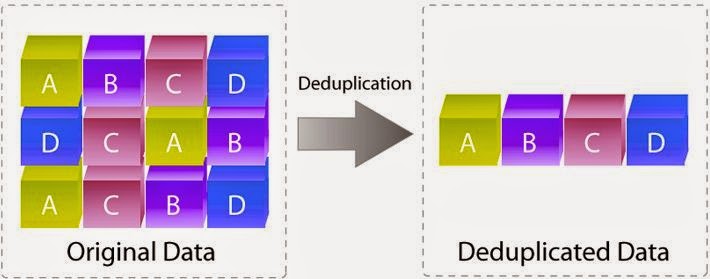


Data Deduplication


Deduplication - never store the same data twice. Save cost and simply recreate the original data from the data you stored.
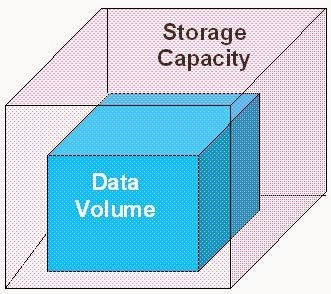


Scalability


Scalable Data Containers - storage container size can simply grow to accommodate data growth. Can your data container grow as your data volume does? Individual storage device limits force the use of many storage devices and drives up complexity and costs.
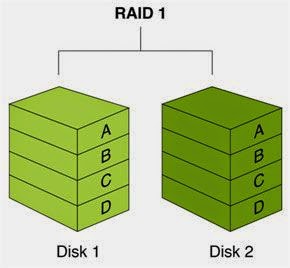


Data Protection Methods


Efficient Data Protection Methods - creating a separate copy of each piece of data to plan for a device failure will force you to have 2X the amount of storage capacity. Your Big Data problem just doubled. You need more efficient data protection algorithms.


Power Costs


Power & Cooling Costs - storage devices must reduce the amount of power they consume or you will pay more money to power and cool your data then the value it has locked inside it.


Variety:

Applications are the automation of business processes. Those processes (applications) create data. Business apps such as ERP, CRM and sales ordering applications create data using input forms whose fields that fit perfectly into the tables of a database. These applications don't just store their data but frequently search that data and rely on the relational database to perform fast searches. The applications make requests to the relational database via SQL statements and the database returns a set of records (recordset) that matches the SQL query statement. To summarize, the structure of the backend database conforms to what is mandated by the forms users use to enter the data in the applications.


Not all Apps are HUMAN
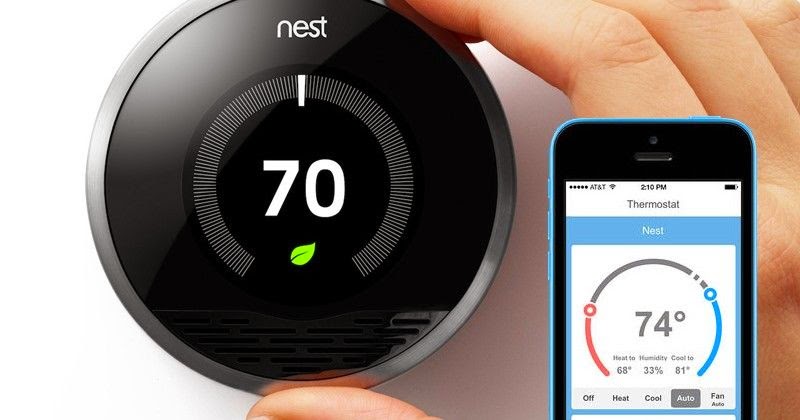

Nest Home Thermostat
Not all applications enter their data using nice form fields that fit perfectly into a database table. Heck, some applications are not even humans creating the data. Examples would include a Nest home automation thermostats (just acquired by Google for $3.2B).  Not all applications need a DB to constantly search, aggregate and display data that they have previously saved. An example would be an CRM app that lists all a customers previous orders.

Unlock the Value Hidden in Big Data
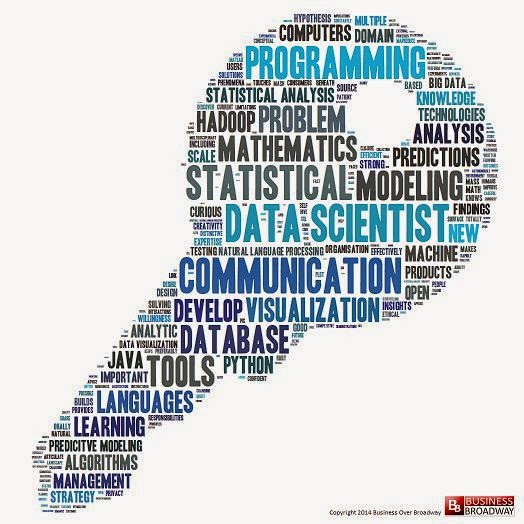
Unlocking Information Hidden in Data
Herein lies the problem. These new devices and applications don't use a database but instead simple files to store their data. Businesses typically collect all their DB data into a data warehouse (large collection of DB data) for analysis and reporting. The DW (data warehouse) reports will track KPIs (Key Performance Indicators) that help leaders make business decisions. Business leaders must make decisions everyday. Those with the most information make the best decisions. That information is hidden in the data and must be extracted with analysis. What about all the varieties of data that don't fit in a database and ultimately make it into your data warehouse for analysis? You are leaving lots of valuable data and the information it would give you hidden in those files. Big data is about getting access to that information to make your business more competitive, productive and profitable.


Business Justification to Drill
Tapping into big data is like drilling for oil. When the oil first comes out of the ground it takes a small amount of effort and money making it profitable to go after. When oil extraction and refinement costs are more than the price we can get for oil on the open market there is no business justification to extract it. The oil, just like the big data in files will remain there until the value goes up or a cheaper way to extract the oil (information) is created.

Let the Drilling Begin!
Enter FREE open source NoSQL databases and cost efficient scale-out block & file systems running on commodity hardware. Suddenly, the cost to extract the data has come way down.
Enter Social Media and its hugely valuable customer preference data.
Suddenly there is a business justification to go after the information locked in these unstructured files.


Social Networking and the internet have created many new data sets or streams that are unstructured data (not structured like in a database). If you want to analyze this type of data you will need something different than a relational database. Recent advances in non-relational databases have given IT shops the ability to easily analyze unstructured or semi-structured data.

What is a relational database? A relational database is a collection of related tables of data. These tables are under the control of the RDBMS - Relational DataBase Management System. The RDBMS is the database application where the database is the collection of related tables of data.


Velocity:

How Many Tweeters?
Human beings can create data via typing at say 60 words a minute. A million Twitter users can create data at 60 million words a minute. Velocity is trying to consume all the Twitter tweets of millions of people in real-time.
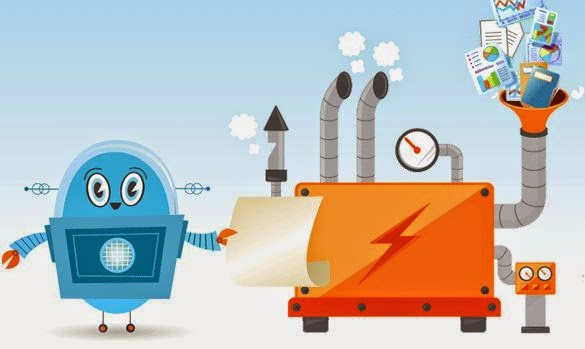
IoT - Internet of Things
Humans are not the only ones creating the data. Smart machines are now sending their data over the internet. We call this concept the IoT or Internet of Things. Gone are the days of calling your customer to ask how they are using your products. Smart companies are embedding simple inexpensive internet hardware into their products that stream useful information home to product teams. How could your company benefit from this type of data? Extracting value from this data often requires that you can analyze it in real-time. This data is not structured so you can't wait to modify it to fit into your database or a data warehouse. Even writing the data to disk and attempting to read it back for analysis may simply be too slow. New methods of using large amounts of RAM to store and query the data for analysis have appeared.

Stream Analysis
Your business's competition is building IT solutions to retrieve these fast data streams and analyze them in real-time to make better decisions about how to interact with their customers. Companies that can innovate the fastest by leveraging technology win.


Conclusion:

The era of Big Data is here. Companies large and small are being disrupted by their competition who are leveraging Big Data. There are examples everywhere of how to use Big Data. There is a learning curve to dealing with big data and it's one you will want to get ahead or you may be finding yourself chasing your competition.

Monday, September 1, 2014

CLOUD 101

Cloud is one of the 4 technologies (Mobile, Cloud, Social and Big Data) that make up 3rd Platform.

Cloud is... a self-service, automated, virtual data center environment. While I'm sure there are exceptions to that rule, when things are not well defined you pick a simple definition and go with it.

A Data Center is made of up of:
  • Physical Servers - 1U or 2U rack servers or blade style servers are common.
  • Physical Networking - wires, switches and routers to direct packets of data over wires
  • Physical Storage - Block and File storage arrays as well as local disk storage in servers
  • Security both physical (building, cameras) and digital (firewalls, intrusion detection systems, etc)
  • Power & Cooling + backup generators for emergency
Server virtualization is often the first step in trying to gain control over costs and complexity while adding much needed agility.  Step 1. choose your hypervisor platform.
Hypervisor
Hypervisor Installed on top of Physical System
A hypervisor is a sort of tiny operating system that gets installed on the bare physical server and allows the administrator to logically segment the physical server into many virtual servers running on the same physical server. Each logical virtual server will have it's own operating system such as Windows or Linux. Each of the virtual servers running on the physical server will not be aware that it has been virtualized. Popular companies and their hypervisor platforms are:

Vmware's vSphere         Citrix's XenServer       Redhat's KVM       Microsoft's Hyper-V

 Virtual servers allow you to pool the physical server's resources such as CPU, Memory and NICs (Network Interface Card). Most applications only require about 10% of the resources of a single physical server. By installing a hypervisor on a physical server you can run on average eight virtual servers that will consume 80% of the available resources. This is where you get the majority of your capital expenditure savings. CAPEX savings is often given as a reason for virtualizing.

After virtualizing your server environment you quickly realize that operationally everything is still a manual process. When a business unit requests an application be deployed, IT still must go through the manual steps to deploy that application all while the business is waiting.
  1. Select a physical server running a hypervisor that has enough unused resources to support the creation of a VM (Virtual Machine) on it.
  2. Configure the VM container resource amounts (CPU, RAM, Storage, Networking) 
  3. Load an OS (Operating System) on the Virtual machine.
  4. Configure the Networking for the VM. 
  5. Provision the Storage for the VM.
  6. Add the VM to the list of IT monitored VMs
  7. Delete or archive VM when no longer needed by business
Cloud technology is the automation of the steps above and allows IT to deliver applications to the business faster.  
Cloud Deployment Models:
  1. Private Clouds - automation is done by IT in their own private DC (Data Center). 
  2. Public Clouds - automation is done by a CSP (Cloud Service Provider) in the CSP's own data center not the private customer's location
  3. Hosted Private Clouds - a CSP dedicates a portioned off set of servers, networking and storage for exclusive use and administration by private IT company.
  4. Hybrid Clouds - Moving of VMs between a compatible private and public clouds.
Hybrid Clouds


While Private cloud allows the business to keep 100% control and security of their applications and data, it requires them to build & operate the private cloud CAPEX & OPEX. Public clouds allow the company to only pay for use but with the downside of loosing control over the operation and security of their data. Hosted private clouds allows the CSP to purchase, configure and be the "hands and eyes" on the servers, networking  and storage while the business knows the hardware is for exclusive use by them. The exclusive use part is important because it improves security and allows the CSP to allow IT some level of administrative access into the configuration and operation of the hosted private cloud. 
The last deployment model called Hybrid cloud is the best of both worlds. Some workloads (applications) may run on the private cloud because of security or controllability. Often the most critical applications to the business require high uptime and rapid response time when anything does impact the applications availability. Less critical workloads may benefit from being deployed on a public cloud. Hybrid cloud computing gives the ability to move workloads sometimes even non-disruptively (to the users of the application) back and forth between private and public clouds. 

Service Models - 'X - aaS'

Cloud Service Models
  1. IaaS - Infrastructure as a Service - upload or select & configure your VM on the IaaS cloud. Examples: Vmware's vCloud Air, AWS EC2, Microsoft's Azure 
  2. PaaS - Platform as a Service - write your custom application on and/or upload it to a private or public PaaS cloud. Examples: Cloud Foundry, Heroku, AWS Elastic Beanstalk, AppFog, etc
  3. SaaS - Software as a Service - pay a fee and get a username/login to use a CSP provided application. Examples: Salesforce.com, Cisco WebEx, ADP, etc.
Consumption / Pricing Models:
  • Pay as you go - order a VM on IaaS, deploy an app on PaaS or a login on SaaS and pay for only what you use and discontinue the service at any time without penalty. While this pricing model is the most flexible it can come at the cost of unpredictable service levels. 
  • Contract basis - Sign a short term 30 day contract or a longer multi-year contract. CSPs can and will often guarantee some level of service in exchange for the longer contract. 
Service Level Agreement:
     CSPs as part of the cloud service will offer what is called a SLA (Service Level Agreement) which is a contract stating what the users of the cloud service can expect for Bandwidth, compute resources, service uptime, problem resolution times, etc.
Self-Service

Self Service:
        Cloud technology automation makes it possible to have a Service Catalog ( a webpage listing all the services offered for rent/lease). Users of the cloud can simply select a service from a menu of choices and have that service provisioned automatically in the CSP's  datacenter or locally on IT's own private cloud datacenter.

Business Value of Cloud:
      Competition is everywhere these days. Business must innovate and bring there ideas to market faster that everyone to gain market share and profits while keeping costs at a minimum. Business needs technology and IT to deploy it for them. IT is in the critical path of nearly everything a business needs these days. Cloud technology is allowing IT to move at the speed of
business.


Sunday, June 22, 2014

SOCIAL NETWORKING 101

Social Networking is one of the 4 technologies (Mobile, Cloud, Social and Big Data) that make up 3rd Platform.
Social Networking Connecting People

Social networking is a method of communicating with people using web and or mobile technology over the internet.

Ray Tomlinson Email Inventor
When I think about where social networking came from... it's like most technologies that did not simply pop into existence but evolved from earlier communication technologies. The very first way humans communicated on the internet was using email. In fact, when the first few computers were connected to form the early internet around 1971, it was Ray Tomlinson who sent the first email from one computer to another by inserting an @ symbol. Before this email was only sent between users on the same computer system.


UseNet News 9 Top-Level Groups
Usenet news was another early method of communication. Users could post messages to series of groups whose names centered around topics of interest that are abbreviated as comp. "computers",  sci. "science", news., talk. and soc. "social".  these messages where all grouped together and copied between servers on the internet. Usenet readers could download some of all of the groups using a usenet news client similar to an email reading program.


Bulletin Board Systems
BBS or "Bulletin Board Systems" were a lot like Usenet news except they were generally not copied between servers but hosted on a single computer that often required the people to connect to the BBS server by dialing into it using a modem. CompuServe was the first to institute a real-time method chat services that was a big hit with users.

Chat programs came into existence everywhere with names like IRC, AOL and ICQ.  Many of these chat programs quickly added features like group chats and even file sharing.

Email, Usenet and BBSs were NOT real-time communications. IRC, AOL and ICQ were a big step forward from a users perspective.

Personal Blog/Website

As personal websites became popular, readers of these early websites wanted a way to communicate with the authors of the sites and that lead to having a comment section on websites. I think of this as the beginnings of blogs like the one you are reading now.

Sharing stories is how early humans evolved and social networking software and websites are just our way of using technology to share stories faster and even globally. Today, Social network sites such as Facebook, Twitter, SnapChat and Linkedin are just a small sample of what is available.

Avatar
Many of these online social services revolved around you creating a personal profile with an avatar or digital representation of yourself. People are very conscious of how other view them. Your digital representation is very important for those who chose to create one. Once your profile is created you can search to find others who you wish to follow and attract them to follow you. Friendster was an early example of this.

Social network is having a massive effect on our global culture. Today any human being with a cell phone can stay connected globally to what is going on in the world. Twitter can be used to spread news around the globe in seconds. There are many famous examples of the effects of people who can communicate instantly to gather in protest or for fun such as "Flash Mobs".
1/2 Price Coffee


I imagine that when the first business was created so were the first attempts to market to potential customers. Before social networking,  phone, road signs, snail mail flyers, and windows signs were how companies marketed to potential customers. Today businesses have a way to connect with any human carrying a smart phone, laptop or tablet. Marketing requires 2 things. 1. Locate the people you have identified as being most likely to purchase your product. 2. Get your pitch in front of them.
Businesses today identify the keywords associated with their perfect potential buyer and can simply search billions of digital profiles on the web to locate their model audience. Sometimes it's not enough just to find the users but to hit them with your pitch at the perfect moment. By gathering information from the phone such as their current location or recent search keywords, companies can target their marketing efforts to those likely to purchase their goods or services at the perfect moment. Imagine being able to popup a 1/2 price coffee offer to a user phone as they walk past your coffee shop.  Google has made a fortune from Adwords that appear in your customer search results.

If you are not seeking and getting in front of you customers in social networking... your competitors are. Buyers are making their decisions using technology such as their phone and the web. Only after their decision has been made do they drive to the store. Traditional marketing groups will find their nontechnical marketing attempts becoming less effective moving forward.

Sunday, April 6, 2014

MOBILE TECHNOLOGY 101

UNLEASH YOUR INNER SUPERHERO


Mobile is one of the 4 technologies (Mobile, Cloud, Social and Big Data) that make up 3rd Platform.

Mobile Apps
Mobile Computing is about having technology in the palm of your hand whenever and wherever you are. Mobile Computing is the stuff of a superheroes. It allows ordinary people to be connected to the intelligence of everyone else in the world.


Mobile computing is not new.  I believe mobile computing was born in 1987.
Apple Newton circa 1987

1987's Apple Newton seems a prehistoric ancestor compared to modern mobile computing devices.


MOBILE COMPUTING DEVICES

Smartphones

Tablets


Google Glass

Smart Watch Concept


Wearable "Smart" Devices


Smart Bracelets

Smart Clothing

Biometric Monitors


Tuesday, February 18, 2014

3rd PLATFORM 101


IDC and Gartner both define the 3rd platform as a loose collection of technologies consisting of mobile, social, cloud and big data.
Mobile Apps

Mobile
Smart phones and tablets are ubiquitous. I would use my smart phone for everything if I could. (insert joke about tiny unreadable screen here)
I want the power to Google whenever & wherever I am!

The trick to understanding Mobile is... it's more about "how we are doing things" these days rather than "what we are doing them on".

2nd Platform required thick SW clients installed on laptops. These SW applications were large, complex applications installed using a CDROMs and required complex updates. They were designed to solve many generic challenges for many generic users.


3rd platform mobile apps are small, click to download, mostly free apps that solve a users single challenge. Mobile "App Stores" are full of millions of small simple apps rather than boxed rather than a few large complex SW applications that solve many generic challenges.

"How" mobile is doing things - The app logic and the data both run and are stored on the web.
This is the salient point. Web apps don't require thick laptop clients with powerful processors and big "local" storage.

Social Networking

Social
Now that these simple mobile apps are keeping you connected to the web not just when your sitting in front of your laptop at work, you can share what you do, when your doing it. @AirportGate @KidsSoccerGame let us know.

Personal websites that required HTML coding knowledge have given way to Facebook pages, blogs, Linkedin and wikis. Users can link themselves to their friends and favorite companies, TV shows, products, etc. These linkages work both ways. Companies can now learn who is following and commenting on their products.

The enormous amount of data being produced from billions of users can show us connections we did not know exist and shape how we feel about the world around us.

Cloud Computing

Cloud
I worked for a Web Hosting provider circa 99's early 2000's and with so much competition for pricing,  we knew that win market share you had to keep capital and operational expenses down by:
1. USE OPEN SOURCE SOFTWARE
2. AUTOMATING

Private IT firms still used commercial off-the-shelf SW or developed their own coded enterprise applications. Cloud providers had self-service e-commerce websites that automated the deployment of Open Source SW for paying customers. System administrators were only there to step in when the automation broke. Customers were signing up for services online with credit cards in the middle of the night and when we arrived at work we would see that the service had been automatically provisioned before we had arrived.


Big Data

Companies have been building relational databases to store their enterprise application data for years. Companies would aggregate their daily generated OLTP transactional data from enterprise applications into data warehouses at corporate HQ. They would then restructure that warehoused data into OLAP databases for analysis.

Enterprise applications are not the only things generating data that companies want to analyze these days. Mobile apps, social websites and the IoT (Internet of Things) are generating huge amounts of data nowadays, Relational DBs just can't handle the this type of data. Big data is not just BIG but FAST and UNSTRUCTURED.

How do you eat an elephant? Answer: One bite at a time.
To analyze big data you must divide and conquer. Dividing the data, analyzing the many pieces independently and putting it back together requires distributed computing and storage. Analyzing unstructured data often requires key-value pairs and columnar not relational databases. Enter Hadoop, Redis and other NoSQL DBs

I will break down each of these 4 technologies Mobile, Social, Cloud and Big Data in future blog posts - stay tuned!